
Write a Prompt Once. Write a Skill Forever.

Most people working seriously with AI have a folder somewhere. A notes document, a Notion page, a shared drive. It is full of prompts that worked, the one that summarises a meeting well, the one that structures a client proposal, the one that writes a decent first draft without sounding like a press release. The collection grows. And yet, every time they start a new conversation, they are back at the beginning. Copying, pasting, adjusting, hoping the output is close enough to what they needed last time.
This is the fundamental limitation of the prompt as a unit of work. It is not that prompts are ineffective but that they are not designed to accumulate. They live outside the AI, require a human to retrieve them, and carry no mechanism to improve over time. Anyone who has tried to scale AI usage across a team has encountered this problem in a more acute form: whose prompt do we use, how do we keep it current, and why does it produce different results depending on who runs it?
We have built skills for our own content and client workflows at Zeroto100, and the difference between a prompt we share and a skill we maintain is not technical. It is the difference between a good idea and an institutional habit. The concept of skills was developed to close exactly that gap.
What a Skill Actually Is
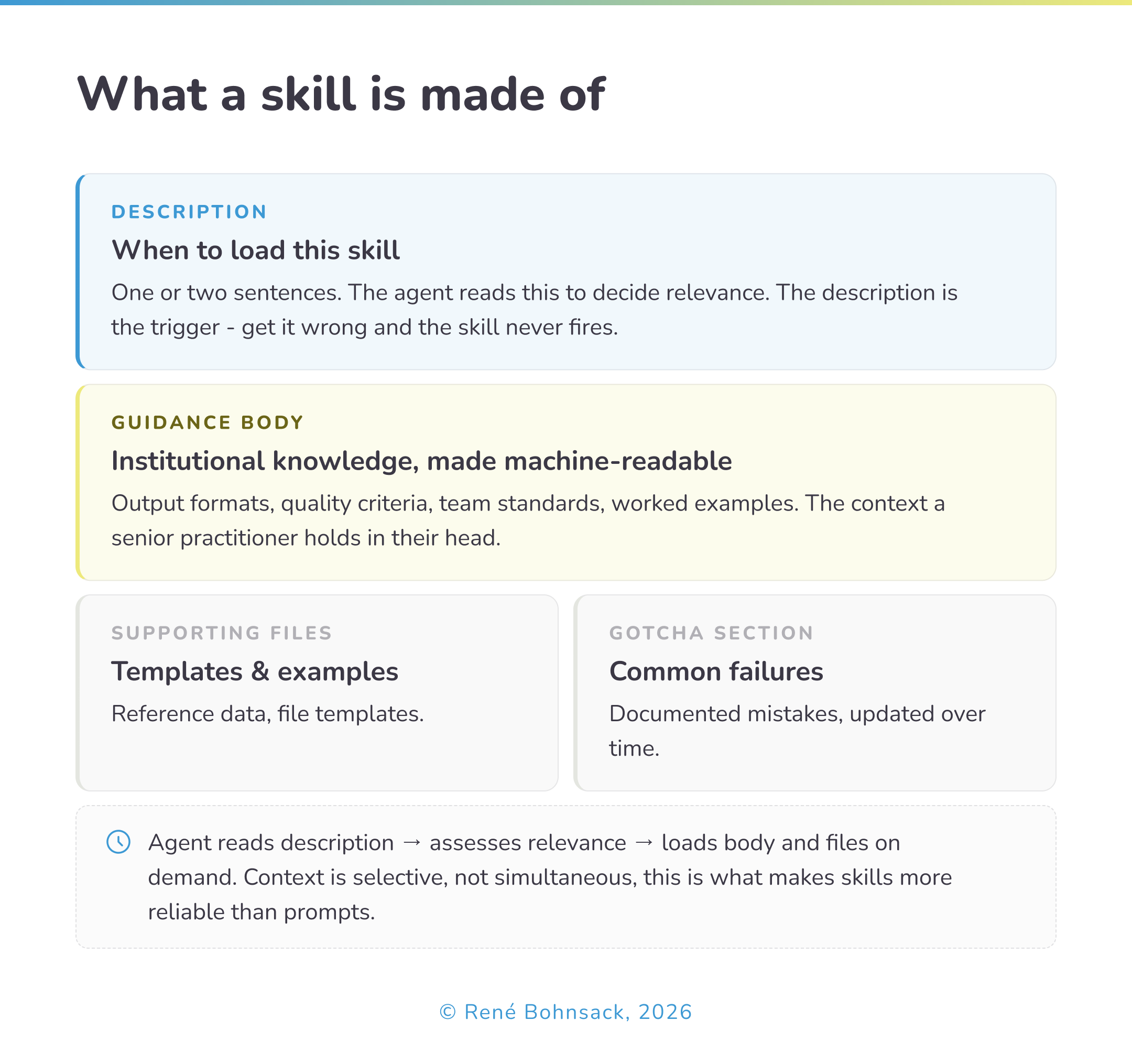
A skill is a structured, reusable capability that an AI agent can load and apply on demand. Where a prompt is a set of instructions passed to a model at the start of a conversation, a skill is a folder, typically anchored by a brief description and a more detailed guidance document, that the agent can locate, assess for relevance, and retrieve selectively as a task requires it.
The distinction matters more than it initially appears. A prompt tells the model what to do right now. A skill tells the model what it needs to know in order to do a category of work reliably, every time, regardless of who initiates the task or which conversation it appears in. A prompt is a message. A skill is institutional knowledge made machine-readable.
In practical terms, a skill might contain:
The exact output format a team uses for client deliverables
The specific criteria for what counts as a complete brief
Common mistakes to avoid in a particular type of analysis
Reference examples of work done well
Explicit notes on edge cases that cause failures
None of this is instructions in the conventional prompt sense. It is context, the kind of context that a senior practitioner carries in their head and a new hire spends months absorbing.
How Skills Differ from Prompts and Custom GPTs
It helps to think of these three formats as sitting on a spectrum of durability and scope.
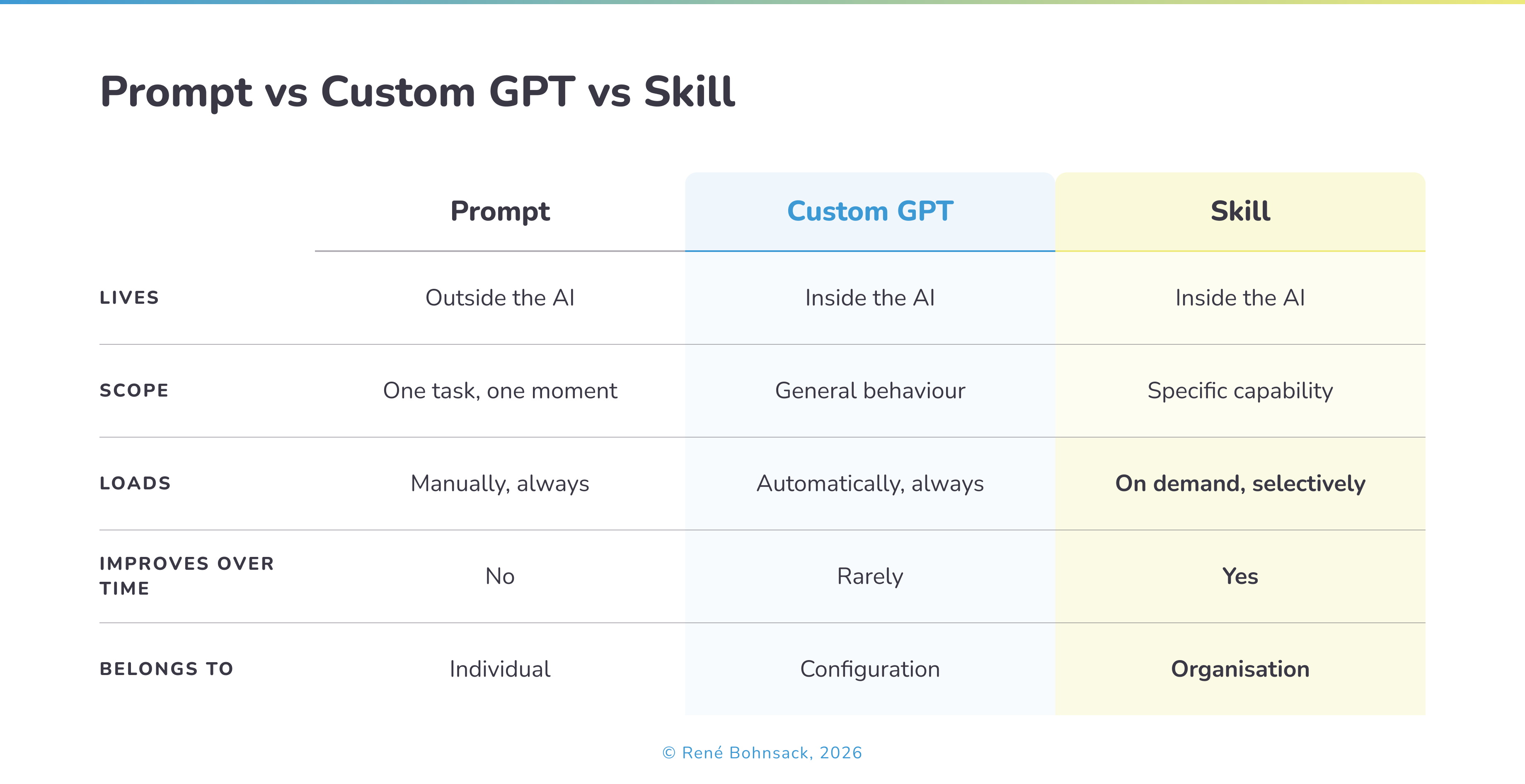
A configured AI assistant knows how to behave in general. What it cannot do is load specialised knowledge selectively based on what a specific task requires - a team writing external reports needs different context than the same team reviewing internal documents. Skills solve this by keeping each workflow’s knowledge in a separate, labelled module. The agent loads only what the current task needs. This is what practitioners mean when they describe the file system itself as context engineering: the architecture of how knowledge is organised determines the quality of what the agent produces.
How to Build Your First Skill
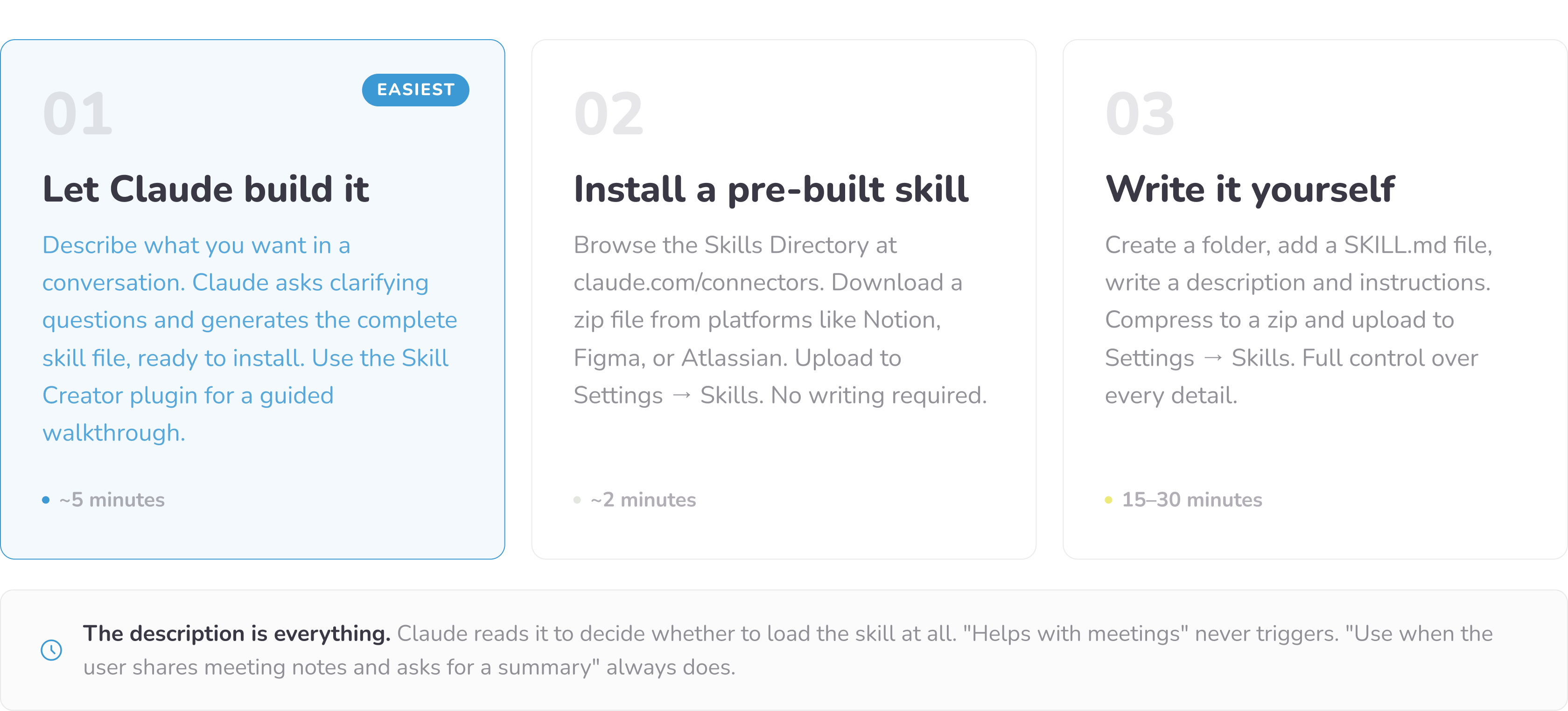
Most people assume building a skill requires writing code or markdown files. It does not. There are three ways to do it, and the simplest takes about five minutes.
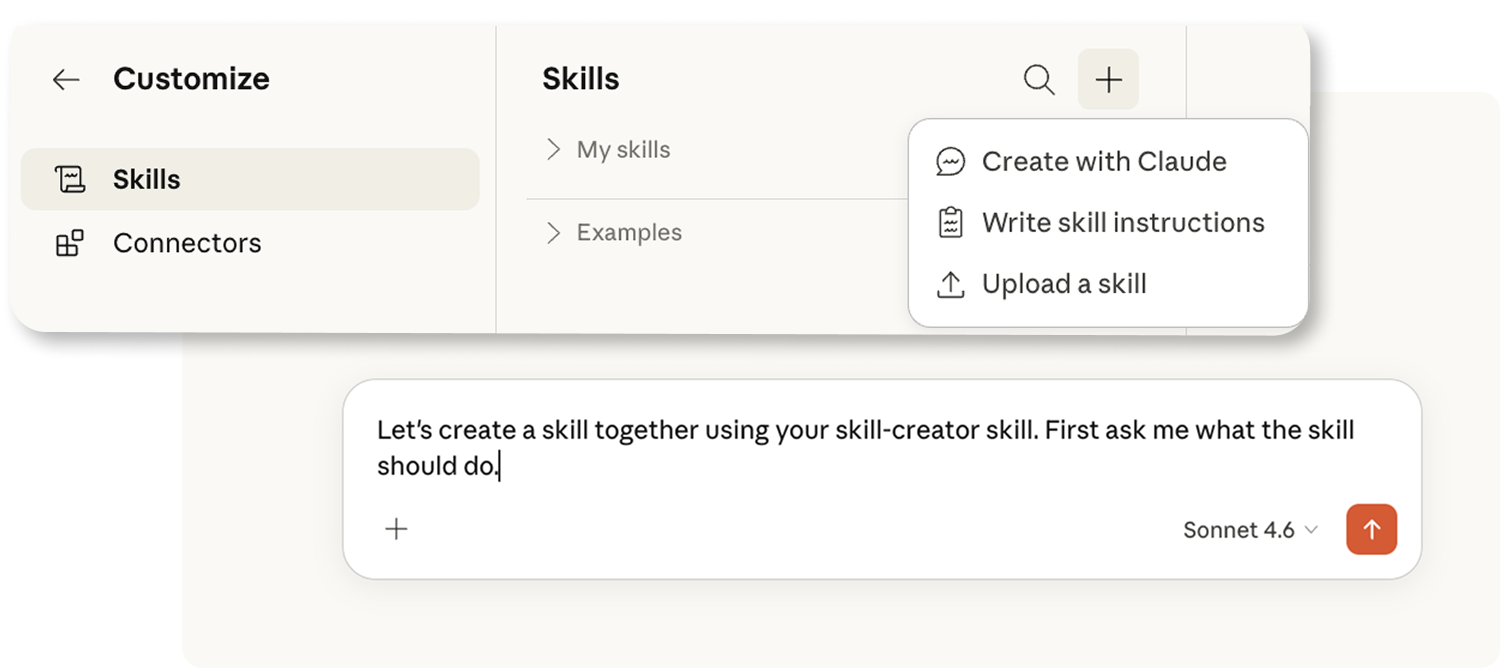
Route 1 — Let Claude build it for you (easiest). Open a conversation in claude.ai and simply describe what you want: “I want a skill that summarises my weekly team meetings into decisions, action items, and open questions. Can you build it for me?” Claude will ask a few clarifying questions and generate the complete skill file, ready to install.
Anthropic also offers a dedicated Skill Creator plugin that walks you through the process step by step. This is the right starting point for anyone who has never built one before.
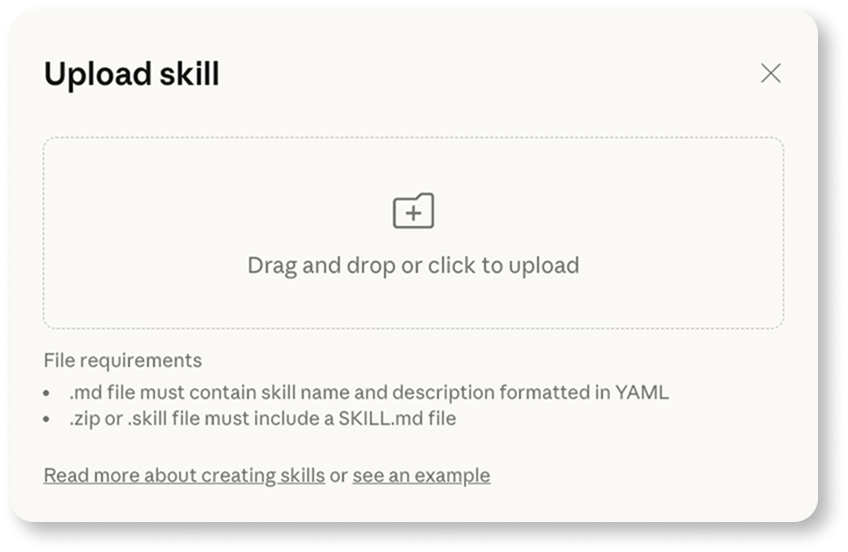
Route 2 — Browse and install pre-built skills. The Skills Directory at claude.com/connectors features professionally-built skills from platforms like Notion, Figma, and Atlassian - download a zip file and upload it to Settings → Skills. No writing required.
Anthropic also publishes its own library of open-source skills on GitHub covering brand guidelines, internal communications, and document creation. Browsing these is the fastest way to understand what a well-built skill looks like before writing your own.
Route 3 — Write it yourself.
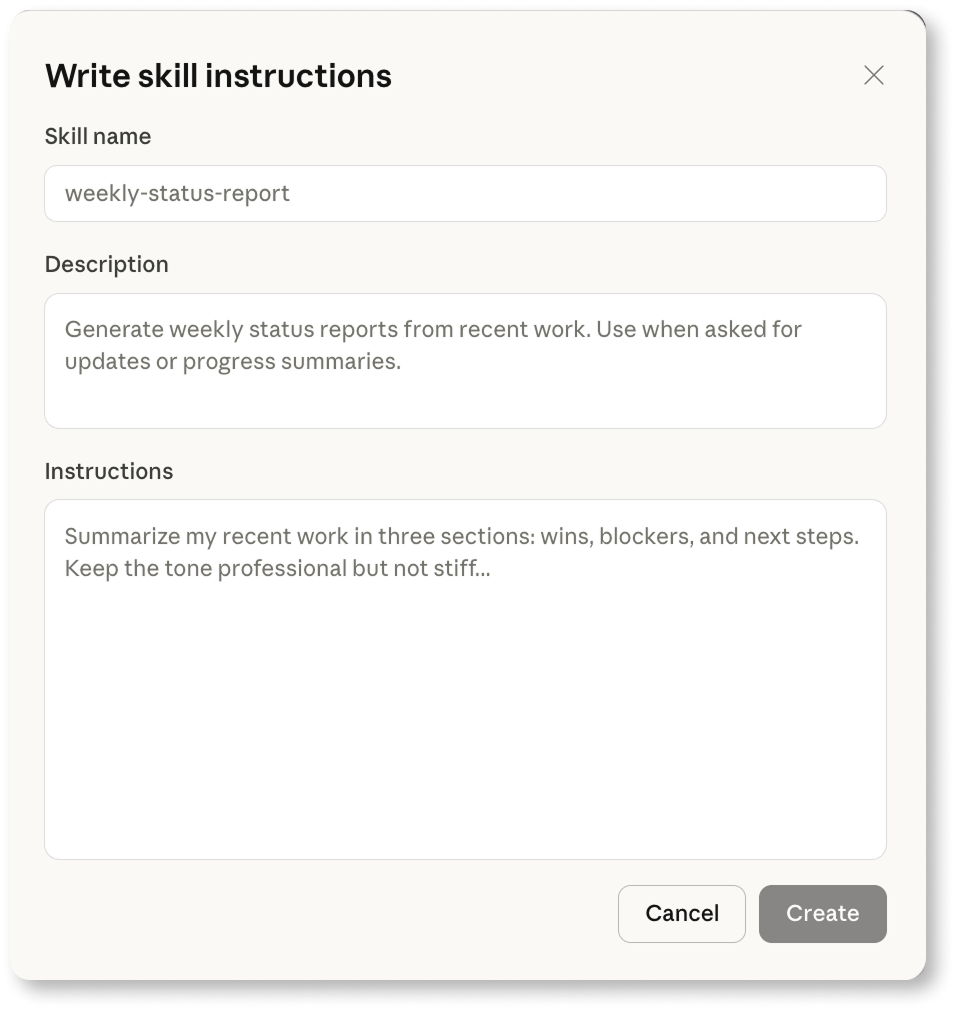
Write directly in Claude:
Or create folder with your skill’s name, add a file called SKILL.md inside it, and write two things:
A short description of when the skill should trigger, and
The actual instructions - the output format you want, the rules to follow, and examples.
Compress the folder into a zip file and upload it to Settings → Skills.
Whichever route you take, the one thing that determines whether a skill works is the description. Claude reads it to decide whether to load the skill at all, so it needs to be specific. “Helps with meetings” will never trigger. “Use when the user shares meeting notes or a transcript and asks for a summary or follow-up” will trigger reliably every time.
Skills are available on all Claude plans including free, though code execution must be enabled in your settings.
The Skill Categories That Matter in Practice
When the team at Anthropic audited a large library of community-built skills, they found that the most valuable ones clustered into recognisable patterns. The nine categories they identified span the full range of professional work, from library and API reference to incident runbooks and infrastructure operations. For most business teams, three categories account for the majority of the value.
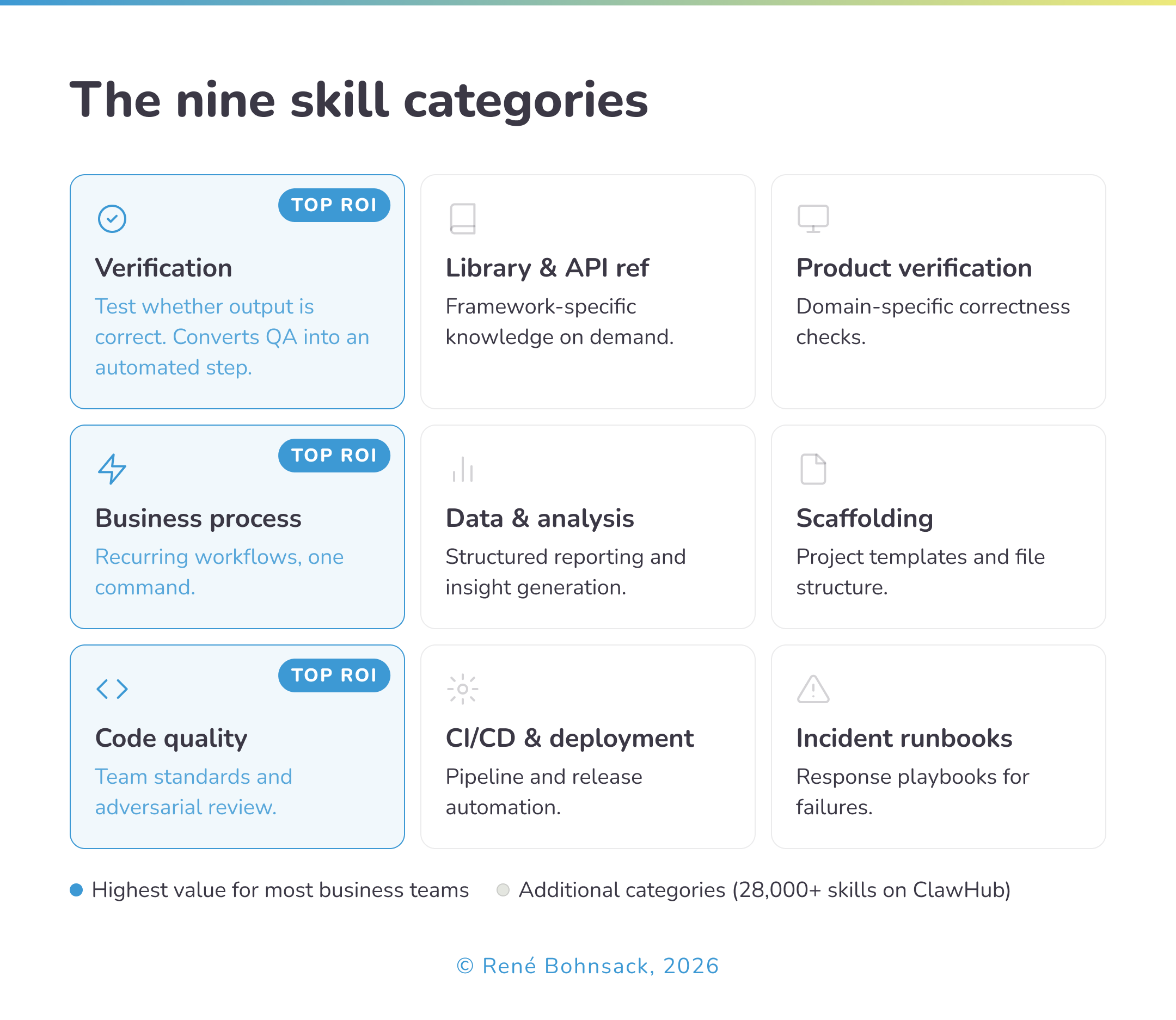
Verification skills describe exactly how to test whether an output is correct. Rather than reviewing finished work and hoping the model got it right, a verification skill gives the agent an explicit checklist: what to check, how to check it, and what to do when something fails. These convert quality control from a human task into an automated step, and consistently show the highest return on investment of any skill category.
Business process skills translate recurring workflows into a single repeatable command. A weekly reporting process that normally requires pulling data from three sources, formatting it, and distributing it becomes a skill the agent can execute end-to-end. The human designs it once; the agent runs it reliably thereafter.
Code quality and review skills go beyond style guides to encode the specific design preferences and architectural patterns a team has developed over time. These are not generic best practices. They are the team’s own standards, made explicit and enforceable without requiring a senior practitioner to review every output manually.
What all three share is that they encode judgment, not just instructions. In my experience working with organisations at different stages of AI adoption, the business process category is where most teams underinvest and where the return appears fastest. It requires no technical expertise to build and addresses the workflows that consume the most time precisely because they are repetitive. The organisations that start here tend to build momentum that carries into the more technically demanding categories later.
Five skills worth having first, based on what teams use most:
Meeting summary - paste any transcript or notes, get structured output with decisions, action items, and open questions.
Email in your voice - define your tone and style once. Claude drafts responses that sound like you, not a press release.
Client proposal - encode your structure, sections, and pricing language. First drafts that follow your format every time.
Weekly report - define what goes in, what stays out, and the order. Pull from notes or data and get a formatted report ready to send.
Content repurposing - paste a long article or transcript and get platform-specific outputs: LinkedIn post, newsletter intro, three social captions.
The Gotcha Section: Where Skills Get Smarter
One of the most practically useful concepts to emerge from mature skill design is what some teams call the gotcha section - an explicit record of common failure points, updated as new mistakes surface.
Most teams currently handle AI failures informally. Someone notices a recurring error, adjusts their personal approach, and the insight stays local. A skill with a maintained gotcha section converts that same learning into something cumulative: every documented failure improves the performance of every future run. The skill becomes smarter not because the underlying model changed, but because the team’s experience was systematically captured and encoded.
What strikes me about this is that it exposes a broader pattern in how organisations currently treat AI failures - informally, locally, with no mechanism for the learning to compound. This is not a skills problem. It is an organisational learning problem that skills happen to make visible. The teams that maintain gotcha sections are, without necessarily framing it this way, building a feedback loop between human judgment and machine execution. Most organisations have not yet decided that this loop is worth designing deliberately.
What to Take From This
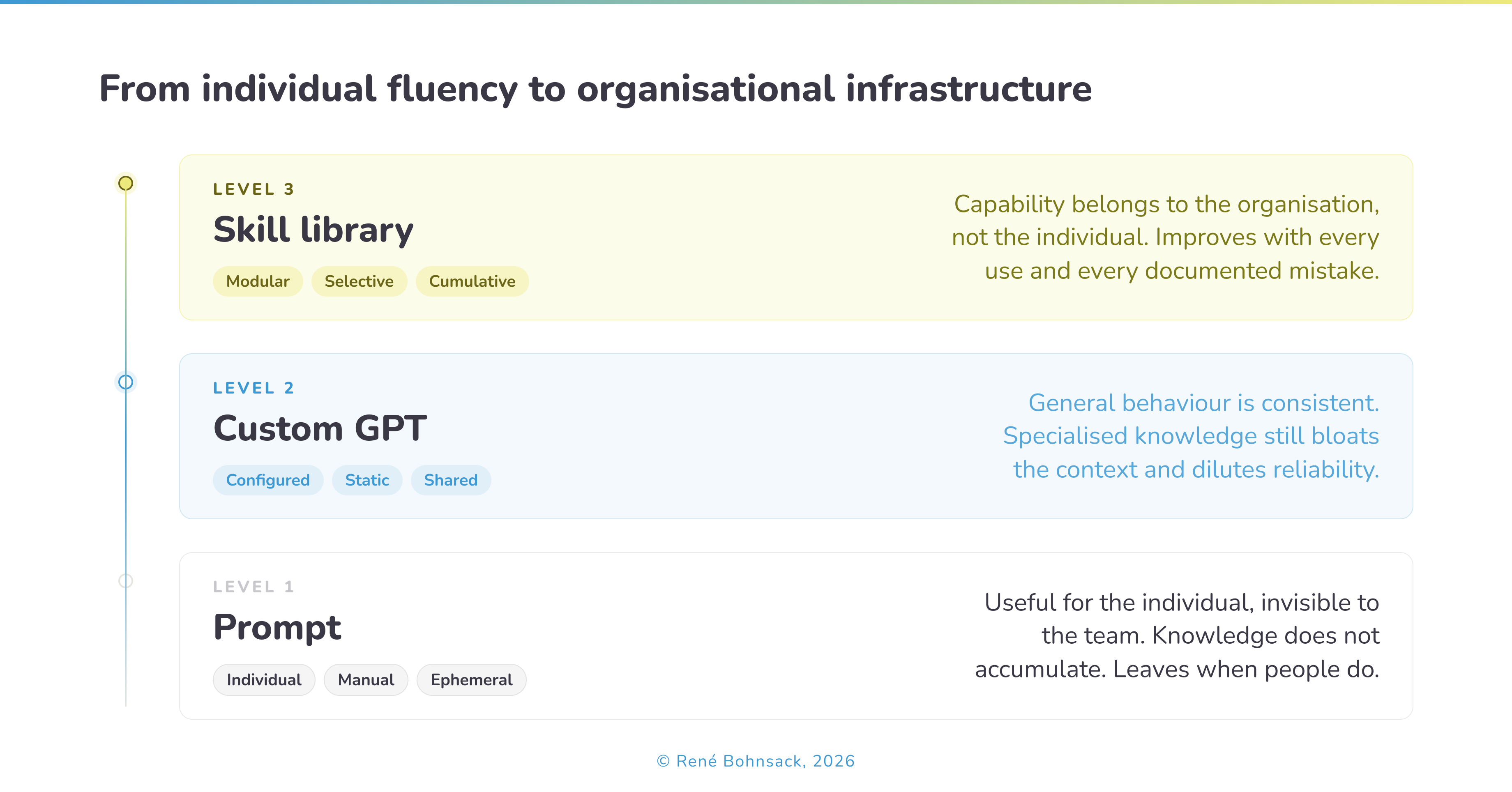
If your organisation’s AI capability currently lives in a collection of prompts that individuals maintain privately, you have individual fluency. That is genuinely useful, but it does not compound. When someone leaves, the knowledge leaves with them. When the team scales, the quality becomes inconsistent.
Skills are the mechanism by which individual fluency becomes organisational infrastructure. The investment is higher than writing a prompt and the design discipline is more demanding. But a well-built skill library grows in value over time, improves with use, and belongs to the organisation rather than to any individual practitioner.
The organisations I see building this infrastructure are not the largest or the most technically sophisticated. They are the ones that decided to treat AI knowledge the same way they treat any other operational asset - worth designing, worth maintaining, worth improving.
The question worth sitting with is not whether your team uses AI effectively today. It is whether the knowledge your team has accumulated about how to use AI well is stored anywhere that survives tomorrow.